How review plans change the review season for associations

Once abstract submissions close, the work shifts to your review committee. You need to match submissions with the right expertise, have enough time to review them, and keep decisions moving toward your program deadline.
That gets complicated when the process depends on spreadsheets and email. Assignments become uneven. Scores need to be consolidated. A reviewer flags a conflict of interest, and someone on staff has to find a replacement.
As the deadline approaches, your team spends more time following up than discussing which sessions belong on the agenda.
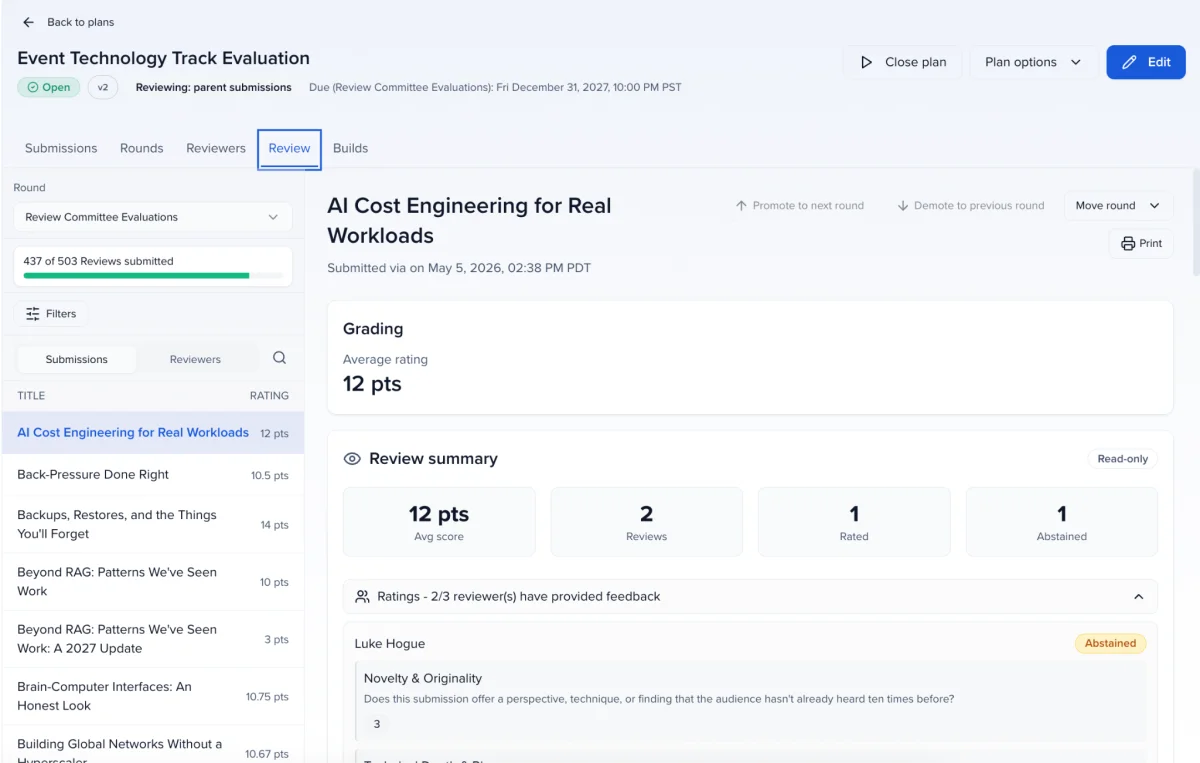
Sessionboard’s review plans bring submissions, reviewer assignments, and scoring into one place, giving staff a way to manage the review cycle and volunteers a clear view of what they need to do.
What is a review plan?
A review plan defines which submissions need to be reviewed, who reviews them, and how they are scored. In Sessionboard, scores stay connected to the submissions they belong to, so staff can follow the review process without reconciling separate files.
There are five steps to setting one up:
- Type: Choose whether reviewers assess full submissions, such as abstracts or sessions, or individual subsessions.
- Overview: Name the plan, choose percentage or points scoring, and configure the basic settings.
- Rounds: Set up each stage of review, including its scorecard and dates.
- Reviewers: Add your reviewers.
- Assignments: Decide who reviews which submissions.

Why it matters for associations
Associations hold their programs to a high bar. Members expect a fair process, accrediting bodies may expect a documented one, and volunteers expect you to respect their time. Review plans are built around all three.
Build the review process around your committee
Few programs settle on a final lineup in one pass. An initial screening checks that submissions meet the requirements, subject experts assess quality and relevance, and the committee makes the final call. Each round gets its own reviewers, scorecard, and dates. Move promoted submissions forward through a funnel, or run rounds in parallel.
Match submissions with the right reviewers
Route submissions by track, topic, or any submission field, or match them to the expertise reviewers picked when they volunteered. Caps on reviewers per submission and submissions per reviewer keep the load even, so the work doesn’t keep falling to the same volunteers.
Support your association’s review policies
Anonymized review hides speaker names when you want scores to rest on the content alone. Reviewers can declare a conflict of interest or abstain, with a required reason if your policy calls for one, and every abstention stays on record when you need to show how decisions were made.
Make participation easier for volunteers
Reviewers sign in to your Program Site with an emailed link: no password, no account to set up. Their queue holds their assigned submissions, your instructions, their progress, and the deadline. Weekly reminders handle the follow-up.
Know where staff need to step in
Your team tracks progress by reviewer and by submission, so unfinished assignments surface before they delay committee decisions. Admins are notified when the last review on a submission comes in.
What program teams are saying
For teams running large, multi-track programs, the difference shows up in the first review cycle. Elizabeth George at Informa Connect put it plainly:
“The new review plans have saved me (this is an accurate number) one BILLION hours when it comes to our review plan.”
— Elizabeth George, HIMSS Global Health Conference & Exhibition (Informa)
Give members a voice before the agenda is final
Your committee brings the expertise to assess submissions. Member voting adds another perspective: which topics does your community want to hear about?
Public voting lets you open a review round to a wider audience. You choose which submissions appear on the ballot, who is eligible to vote, and how voters sign in. Participants use your Site link to score submissions with the round’s scorecard.
For an association, that input can help in several ways:
- Understand interest while you can still act on it. Voting results can inform session placement and room sizes before the agenda is finalized.
- Involve members in program planning. Voting gives members a way to contribute beyond submitting a proposal or attending the event.
- Control participation. Require an emailed sign-in link to connect votes to confirmed email addresses, and limit how many submissions each person can support.

Turn review results into program decisions
Scores give your committee a basis for discussion. The committee still decides what belongs in the program, considering the results alongside the mix of topics, formats, and tracks.
Reviewers can recommend accepting, declining, or keeping a submission as an alternate. They can also suggest a different format or track.
Once decisions are ready, staff can apply recommendations to submission statuses in bulk, with a preview before changes are made. Acceptance targets by session type and track help the team see how the program is taking shape and where adjustments may be needed.
Review results can be exported into reports for your board and leadership. When the next call for presentations opens, you can duplicate the plan and update it for the new cycle.
Plan your next review cycle
If your team is still coordinating abstract review through spreadsheets, start with the process your committee already follows: its review stages, areas of expertise, scoring criteria, and deadlines.
We can show you how that process would work in Sessionboard, including where member voting could fit.