Medical societies
High-volume poster halls, with publication consent and embargo handled where the poster is collected.

One poster experience, online and on site. Posters connects directly to the program you already manage, so each upload automatically appears wherever it needs to be. Publish a branded, searchable online gallery. Display posters on venue screens everywhere. Save posters, copy citations, grab the QR, or download. Keep posters and authors always connected.
SESSIONBOARD POSTERS
Branded gallery: publish a searchable gallery attendees can browse. Attendee actions: let attendees bookmark posters and ask the author a question. Connected records: keep every poster tied to its author and session. Engagement data: opens, dwell time and the searches that found nothing. Kiosk display: open the gallery full-screen on any hall screen. QR codes: per-poster codes that open on phones. QR label sheets: print one label per poster for the boards. Multiple galleries: run several, each with its own content, access and dates.
WHO IT'S FOR
Medical societies, academic conferences and professional associations.
High-volume poster halls, with publication consent and embargo handled where the poster is collected.
Searchable galleries that give every accepted poster a permanent, citable home.
Three-day poster halls turned into year-round, non-dues member value.
THE PROBLEM
Posters carry some of the best thinking at your event and get the least attention. The digital version is a PDF list on a microsite; the on-site version is a wall of boards. Neither talks to the other, authors lose the thread after their session, and when the hall closes, hundreds of hours of research disappear into a drive nobody reopens.
STEP 01 · THE SOURCE
Nothing is imported and nothing is re-keyed. In Sessionboard an accepted abstract already is the session — the same record, carrying its title, its authors and their affiliations, and its track. The poster hangs off that record, so the gallery is assembled from data your program team already owns. This is the part the specialist ePoster tools cannot do: they host beautiful posters, but they import their metadata from someone else's abstract system by spreadsheet, and it goes stale the moment an author fixes a name.
STEP 02 · COLLECTION
The poster ask is an upload slot of kind Poster, defined once under Program → Settings → Files, and it is what feeds everything downstream. Because the slot knows which sessions it applies to, coverage splits them into Uploaded and Missing — so chasing the gaps is a view you can send reminders from, not a spreadsheet you maintain. Filter the slot to Format is Poster and your keynotes never show up as missing a poster.
STEP 03 · THE PRESENTER
Authors use the portal they already use for everything else. When your gallery requires it, the publication consent statement is a required checkbox at the moment of upload, recorded against that author and that version — not chased by email afterwards and not kept in a side spreadsheet. For a medical society this is the difference between a compliance step that is built in and one that is bolted on. The Content tab warns you how many selected sessions still lack consent before you publish.
STEP 04 · WHEN THERE IS NO FILE
Some authors never send a file. Rather than leaving a hole in the hall, Create drafts from abstracts — or Draft with AI — opens the Poster Builder on the abstract that is already on the session. It is a block editor: sections, key findings, charts, figures and references, a two- or three-column layout and an accent colour. Publish to gallery renders it to PDF, files it in that session's Poster slot, and it joins the same pool as every uploaded poster. Republish after edits.
STEP 05 · THE GALLERY
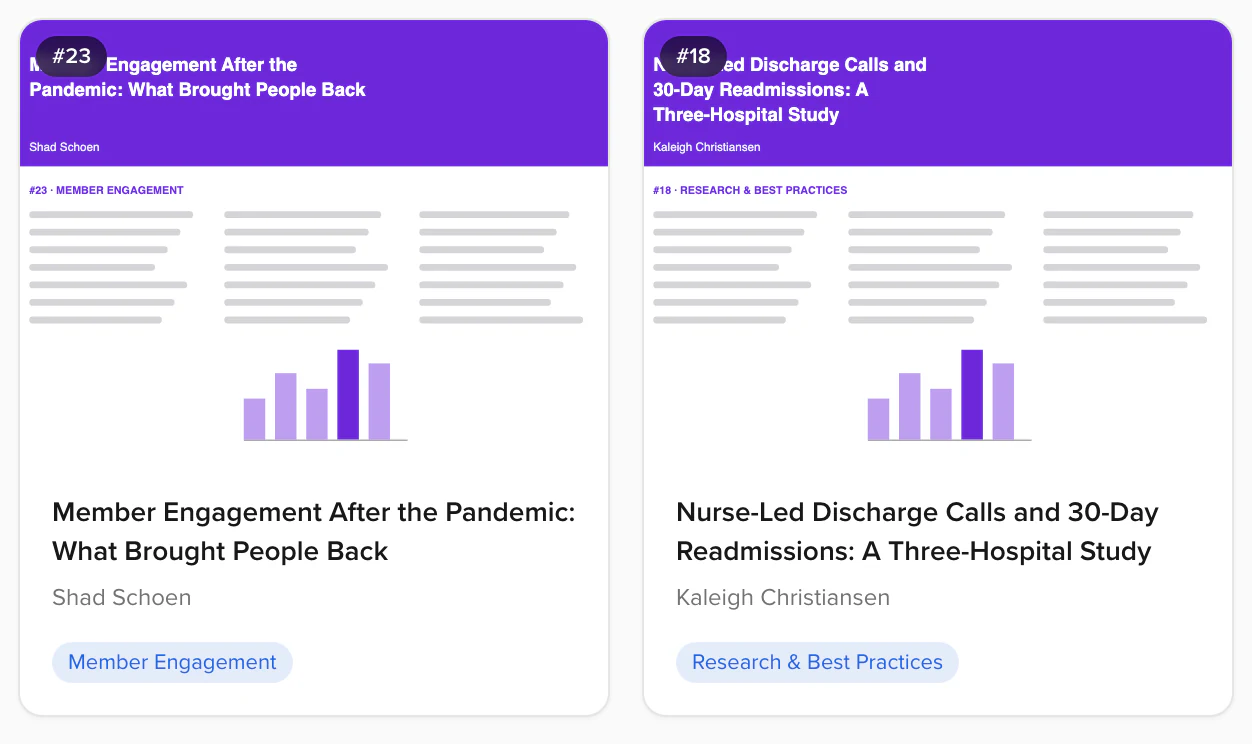
Your gallery should feel like part of your event, not a separate microsite. Appearance gives it a public title and description, a theme, an accent colour, your logo and banner — and a sponsor slot, label, logo and link, if someone paid for the wall. Behavior decides what visitors can actually do: search, downloads, share actions, bookmarks, add to calendar, Ask the author, how posters are grouped, the default sort and which filter chips they see. Run several galleries off one event, each with its own content, access and dates.
STEP 06 · ACCESS
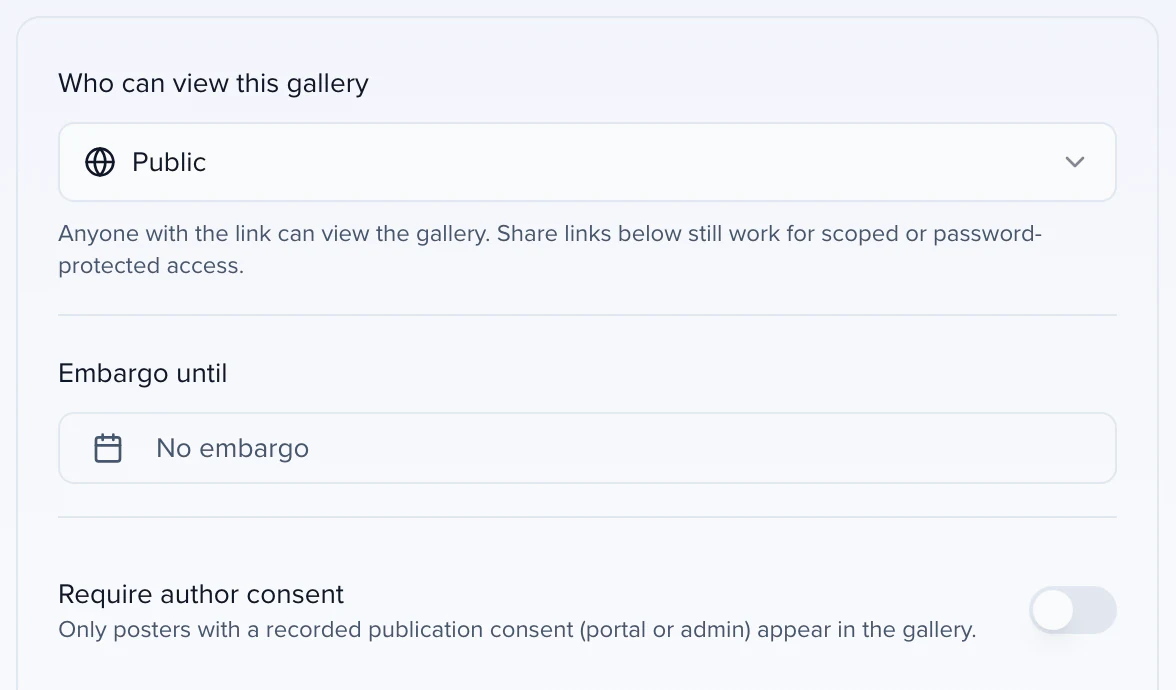
Access & Compliance is one tab, and it covers the two questions a medical or scientific program always asks: who can see this, and not before when. Public is anyone with the link. Share link only switches the public URL off and serves only the named links you create, each with an optional password, each deactivated on its own. Gated asks visitors to verify their email, with an optional allowed-domain list. Embargo holds everything until a date and time in the event's timezone, as a Teaser with titles and a countdown or Hidden entirely — and protected galleries serve signed, expiring file URLs, with embargoed files tagged in storage so the CDN refuses a direct read.
WHO CAN SEE IT, AND NOT BEFORE WHEN
STEP 07 · THE VISITOR
No app, no plugin, no login unless you asked for one. PDF, image, video and audio all render inline — including on iOS Safari, where poster PDFs most often fail to open. Each poster carries its session and authors, its own link and QR code, a citation to copy, and an AI summary generated from the abstract that was already in the system. Where you have enabled it, visitors bookmark posters to a browser-local My list, add a poster session to their calendar, and ask the author a question — questions land in a moderated queue on the gallery's Analytics tab rather than going straight to the author's inbox.
STEP 08 · ON SITE
The physical hall and the online gallery are the same thing seen twice. Share & print gives you QR label sheets — one printable label per poster, with its number, title and authors — so a board in the hall opens that poster on a phone, and a QR for the gallery as a whole for the programme and the signage. For the touchscreen by the entrance there is a kiosk link: the gallery full-screen, with an attract loop, an on-screen keyboard and a high-contrast mode.
STEP 09 · IN THE APP
Attend's Posters & abstracts surface does not get its own configuration. You point it at a Poster Gallery and it inherits that gallery's settings: which posters, which fields, search and filters, downloads and sharing, author consent and the embargo. One place to get the rules right, two places they apply. Attendees browse and search, open an abstract and zoom into the poster, save the ones they want, and find the board on the venue map. You can also list poster sessions and accepted abstracts that have no file yet.
STEP 10 · REVIEW AND AWARDS
Posters are sessions, so they go into the Review plans and rounds your committee already runs — the same scorecards, the same reviewer portal, the same progress dashboard — and into the Awards programs you already run for poster of distinction. Nothing here is a second product with its own licence, its own logins and its own export to reconcile — which is how point tools in this category are often sold.
STEP 11 · WHAT YOU LEARN
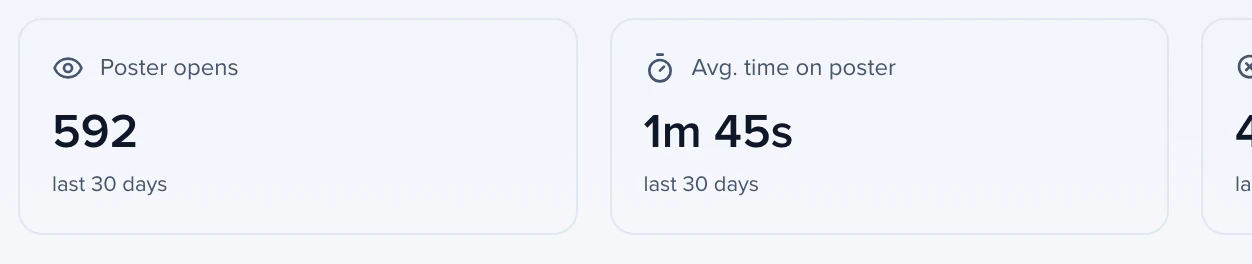
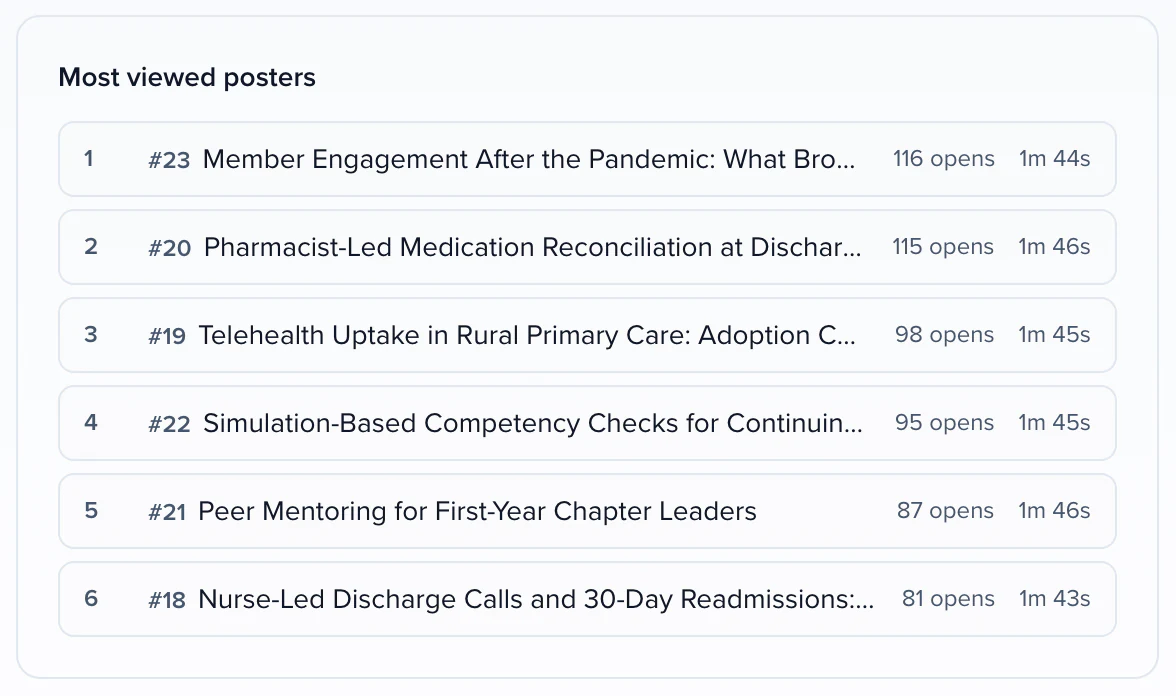
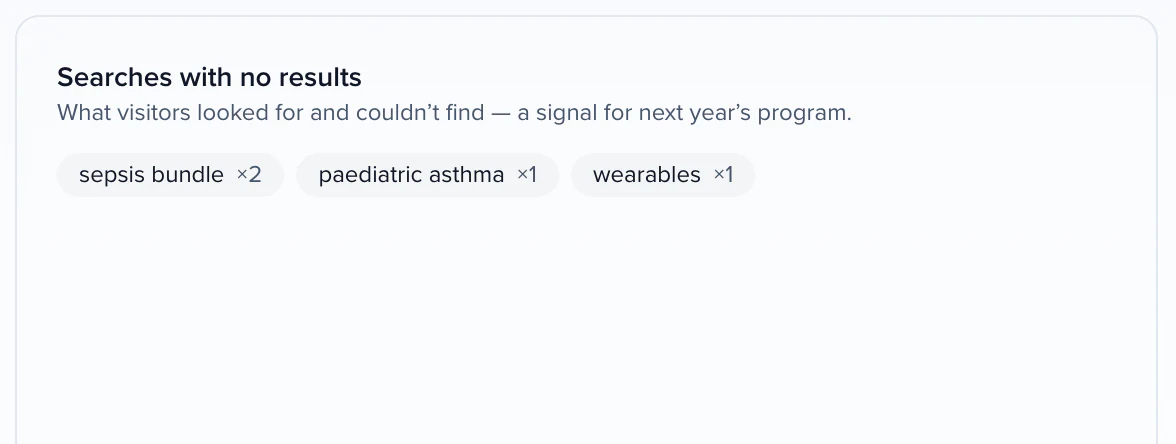
Analytics tracks opens and dwell time per poster, your top posters, the moderated questions queue, and a CSV export. The line nobody else gives you is zero-result searches: the exact terms attendees typed that matched nothing in your gallery. That is not a vanity metric, it is next year's call for abstracts, written by your audience. Authors get an engagement report of their own — the one email they forward.
01 OPENS
02 WHAT LANDED
03 WHAT WAS MISSING
STEP 12 · AFTERWARDS
A poster session is over in a few hours; the research is not. A poster here can become a Lesson, feed a Content Gallery and the clips you cut from your sessions, and it stays attached to one author record across every talk and poster that person has ever given you. That is the part that compounds: next year's programme committee can see what this author presented, how it performed and who came looking for it, instead of starting from an empty form.
WORKS WITH
Posters is not a module you run beside everything else. It reads from the call for abstracts, the speaker portal, Review and Awards, and it writes into Attend and your marketing and content surfaces. Registration, your AMS and your event platform stay exactly where they are.
We reached a point where the scale and complexity of our program demanded a more connected, purpose-built system. We weren't just managing sessions, we were managing a living ecosystem of speakers, abstracts, reviewers, committees, and content. Sessionboard unified that ecosystem in one platform, giving every stakeholder visibility and control.
GUIDE
What a poster platform should do beyond the viewer
Download the guide to see what a poster platform should do beyond the viewer: collection, galleries, on-site display, engagement and measurement on one record.
Download the guide →Posters is available on Enterprise, switched on per event while it is in Early Access.
A standalone ePoster platform hosts poster files. It does not own your abstract data, so every title, author, affiliation and track has to be imported from the system that does — usually by spreadsheet, once, and then again every time something changes. In Sessionboard the abstract and the session are one record: an accepted abstract already is the session the poster hangs off, so the gallery is built from data you never re-enter. That is the whole difference, and it is why the gallery, the coverage view, the speaker's portal and the event app never disagree about which poster is current.
No. A gallery holds no uploads of its own. It collects whatever authors upload, or build, into one Poster upload slot on their sessions, and the event app takes its posters and its settings from that same gallery. One upload, one place to configure, two surfaces.
Yes. Set an embargo date and time in the event's timezone and choose Teaser, which shows titles with a countdown but keeps the file locked, or Hide, which shows nothing until the embargo lifts. The event app honours the same embargo, and embargoed files are tagged in storage so they cannot be read directly from the CDN.
One of three modes. Public is anyone with the link. Share link only turns the public URL off and serves only the named links you create, each with an optional password, each deactivated on its own. Gated asks visitors to verify their email first, with an optional allowed-domain list. Protected galleries serve signed, expiring file URLs.
Coverage splits the sessions the slot applies to into Uploaded and Missing, so chasing the gaps is a view rather than a spreadsheet, and you can send reminders from it. For the ones still missing, the Poster Builder can draft a poster from the abstract already on the session — a block editor for sections, key findings, charts, figures and references. Publish to gallery renders it to PDF and files it in that session's Poster slot.
The upload becomes the current poster. A session has one current poster, and the later file wins whichever way it arrived; the earlier one stays in the session's version history. The gallery, the coverage view and the speaker's portal all show the same, latest poster.
Yes, using the Review plans and rounds and the Awards programs you already run for the rest of your program. Poster of distinction is a category in an Awards program, not a separate product with its own licence.
The gallery's Share & print menu prints one QR label per poster for the boards, each opening that poster on a phone, and a QR for the gallery as a whole. For a touchscreen in the hall there is a kiosk link with an attract loop, an on-screen keyboard and a high-contrast mode. In the event app, Posters & abstracts can point at the board on the venue map.
Posters is an Enterprise feature, currently in Early Access as a Beta. Access is granted per event — request it and our team switches it on for your event. Until then, Publish → Posters is still in the sidebar and opens a page explaining what it does, with the request button.
GET STARTED
Your posters carry your community's best thinking. Give them an experience that matches — online, on every screen, and on every board, all connected to the program you already run.
YOUR NEXT CALL FOR PAPERS IS THE PLACE TO START
Make this year's program the reason next year's is bigger.